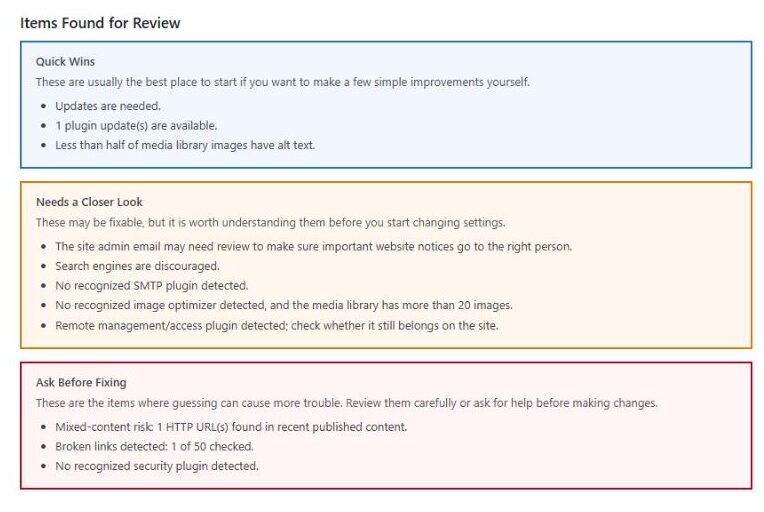
The GTB Site Audit Plugin gives WordPress site owners a quick first look at what may need attention behind the scenes.
After installing the plugin, go to Tools → GTB Site Audit inside your WordPress dashboard and run a quick self-scan. The scan stays on your website and does not send anything to Grim unless you choose to send the full report.
The quick report checks for common WordPress concerns like:
available plugin or site updates
broken links
mixed-content or HTTPS warnings
missing security basics
missing SMTP/email delivery setup
image cleanup and missing alt text
possible performance or caching gaps
plugin clutter or inactive plugins
old access or remote management tools
other first-pass items that may need review
Results are grouped into simple sections:
Quick Wins
Good starting points if you want to make a few simple improvements yourself.
Needs a Closer Look
Items that may be fixable, but are worth understanding before changing settings.
Ask Before Fixing
Items where guessing can cause more trouble. Review carefully or ask for help before making changes.
If you are comfortable handling the results yourself, you can use the quick scan as a checklist. If you are unsure what something means or want help fixing it, you can send the full report to Grim for review and a quote.
Quotes start at $49 for issues that can be fixed or guided through in 30 minutes or less. Larger cleanups or more complicated problems will be quoted separately.
Important Notes
This plugin does not fix your website automatically. It gives you a first-pass report so you can see what may need attention.
The scan is not a replacement for a full manual website review, but it is a helpful starting point if you are wondering what shape your WordPress site is really in.
How to Use It
Download and install the plugin on your WordPress site.
Go to Tools → GTB Site Audit.
Run the Quick Site Scan.
Review the results.
Fix what you feel comfortable fixing, or send the full report to Grim for a quote.